SimdGcdrNet
Pure-C# GCDRNet (IEEE TAI 2023): shadow removal and appearance enhancement for camera-captured documents. No onnxruntime or any third-party inference engine.
dotnet add package Sdcb.SimdGcdrNet
dotnet add package Sdcb.SimdGcdrNet.Models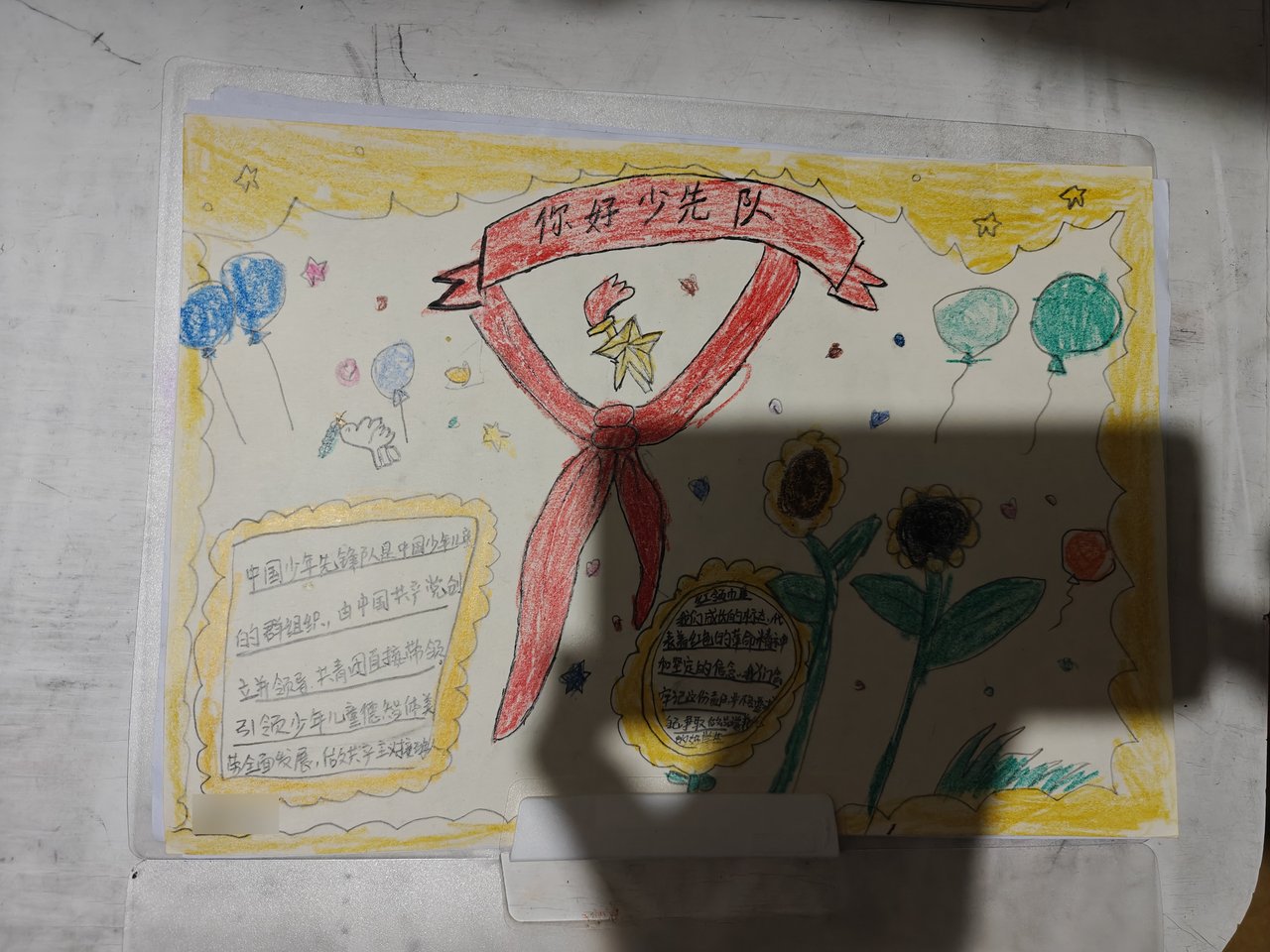

Drag the divider — a phone photo of a poster with a hard hand shadow
Why
Shadows out of phone photos, before anything else
Phone photos of documents almost always carry hand shadows, creases and show-through. GCDRNet is a two-stage network: GC-Net estimates a per-pixel illumination map, a division correction follows, then DR-Net consumes both the original and the corrected image to restore detail.
SimdGcdrNet ports the model and the inference engine itself into C#: a bundled ONNX proto reader and a graph compiler (shape specialization, constant folding, operator fusion, arena planning), with convolutions, LayerNorm and activations hand-written in SIMD. No onnxruntime, no third-party inference engine — one NuGet package is everything.
- Any interleaved 8-bit layout: Bgr24 / Rgb24 / Bgra32 / Rgba32
- Arbitrary strides, in-place enhancement
- Thread-safe GcdrEnhancer
- Native AOT compatible
- Models embedded as resources, zero-copy
- Pads to a multiple of 32 (replicate), crops back
Teal: GPU backends. In the browser it is always the CPU PackedSimd tier.
Quick start
Bring your own imaging library — pass pixel memory directly
using Sdcb.SimdGcdrNet;
using Sdcb.SimdGcdrNet.Models;

// Auto:macOS Apple Silicon 优先 Metal,否则 Vulkan,最后退回 CPU(默认值是 Cpu)
using GcdrEnhancer enh = GcdrEnhancer.FromBytes(GcdrModels.GcNet, GcdrModels.DrNet, GcdrBackend.Auto);
// 不用模型包时:GcdrEnhancer.FromFiles("gcdrnet_gcnet_sim.onnx", "gcdrnet_drnet_sim.onnx", ...)

byte[] dst = enh.Enhance(bgr, width: 1600, height: 1152);   // 紧密排列的 BGR24,HWC
// 带 stride、任意 8 位交错格式,输出与输入同格式(alpha 原样拷回),可原地写:
enh.Enhance(srcSpan, w, h, srcStride, dstSpan, dstStride, GcdrPixelFormat.Rgba32);using SixLabors.ImageSharp;
using SixLabors.ImageSharp.Formats;
using SixLabors.ImageSharp.PixelFormats;
using System.Runtime.InteropServices;
// 克隆 Default:改 Configuration.Default 会丢掉解码器注册
Configuration cfg = Configuration.Default.Clone();
cfg.PreferContiguousImageBuffers = true;
using Image<Rgba32> image = Image.Load<Rgba32>(new DecoderOptions { Configuration = cfg }, "sample.jpg");
if (!image.DangerousTryGetSinglePixelMemory(out Memory<Rgba32> memory))
throw new InvalidOperationException("pixel buffer is not contiguous");
Span<byte> pixels = MemoryMarshal.AsBytes(memory.Span);
// 原地增强:src 与 dst 是同一块内存
enh.Enhance(pixels, image.Width, image.Height, image.Width * 4, pixels, image.Width * 4, GcdrPixelFormat.Rgba32);using SkiaSharp;
using SKBitmap bitmap = SKBitmap.Decode("sample.jpg").Copy(SKColorType.Bgra8888);
unsafe
{
enh.Enhance(
new ReadOnlySpan<byte>((byte*)bitmap.GetPixels(), bitmap.RowBytes * bitmap.Height),
bitmap.Width, bitmap.Height, bitmap.RowBytes,
new Span<byte>((byte*)bitmap.GetPixels(), bitmap.RowBytes * bitmap.Height),
bitmap.RowBytes, GcdrPixelFormat.Bgra32);
}using OpenCvSharp;
using Mat image = Cv2.ImRead("sample.jpg", ImreadModes.Color);
int stride = (int)image.Step(); // Mat 的 Step() 直接当 stride 传
unsafe
{
enh.Enhance(
new ReadOnlySpan<byte>((byte*)image.Data, stride * image.Height),
image.Width, image.Height, stride,
new Span<byte>((byte*)image.Data, stride * image.Height),
stride, GcdrPixelFormat.Bgr24);
}using System.Drawing;
using System.Drawing.Imaging;
using Bitmap bitmap = new("sample.jpg");
BitmapData data = bitmap.LockBits(new(0, 0, bitmap.Width, bitmap.Height),
ImageLockMode.ReadWrite, PixelFormat.Format24bppRgb);
try
{
unsafe
{
Span<byte> pixels = new((byte*)data.Scan0, data.Stride * bitmap.Height);
enh.Enhance(pixels, data.Width, data.Height, data.Stride, pixels, data.Stride, GcdrPixelFormat.Bgr24);
}
}
finally { bitmap.UnlockBits(data); }using GcdrEnhancer enh = GcdrEnhancer.FromBytes(GcdrModels.GcNet, GcdrModels.DrNet, GcdrBackend.Auto);
// Auto:macOS Apple Silicon 上 Metal,有 Vulkan 计算设备则 Vulkan,否则 CPU;
// 也可显式写 GcdrBackend.Vulkan / Metal / Cpu。
// Vulkan:单命令缓冲图执行,融合流水线 bgr2nchw → GC → div6 → DR → nchw2bgr。Performance
From RTX to Snapdragon to the browser
Numbers from the per-device reports under docs/ (49-image RealDAE corpus, warm-up excluded).perf.md ·wasm.md ·corpus.md
RTX 3080 Ti · single 1600×1152
PyTorch vs SimdGcdrNet Vulkan
SimdGcdrNet's 9.6 ms already includes upload/download and pre/post.
Corpus mean · CPU vs GPU
49 RealDAE · ms/img
In the browser
Edge · Ryzen 9 5950X · ms/img
Desktop AVX2 on the same 5950X runs ~420 ms/img — the browser reaches 60% of it.
Pairs well
Enhance, then hand off to SimdPaddleOCR
Both libraries consume the same decoded pixel buffer: SimdGcdrNet enhances in place and SimdPaddleOCR reads it straight — no re-encoding, no copies. This RealDAE page on the right has heavy show-through: OCR on the original returns 56 lines (mostly garbage from the back side), on the enhanced image the 14 real lines.
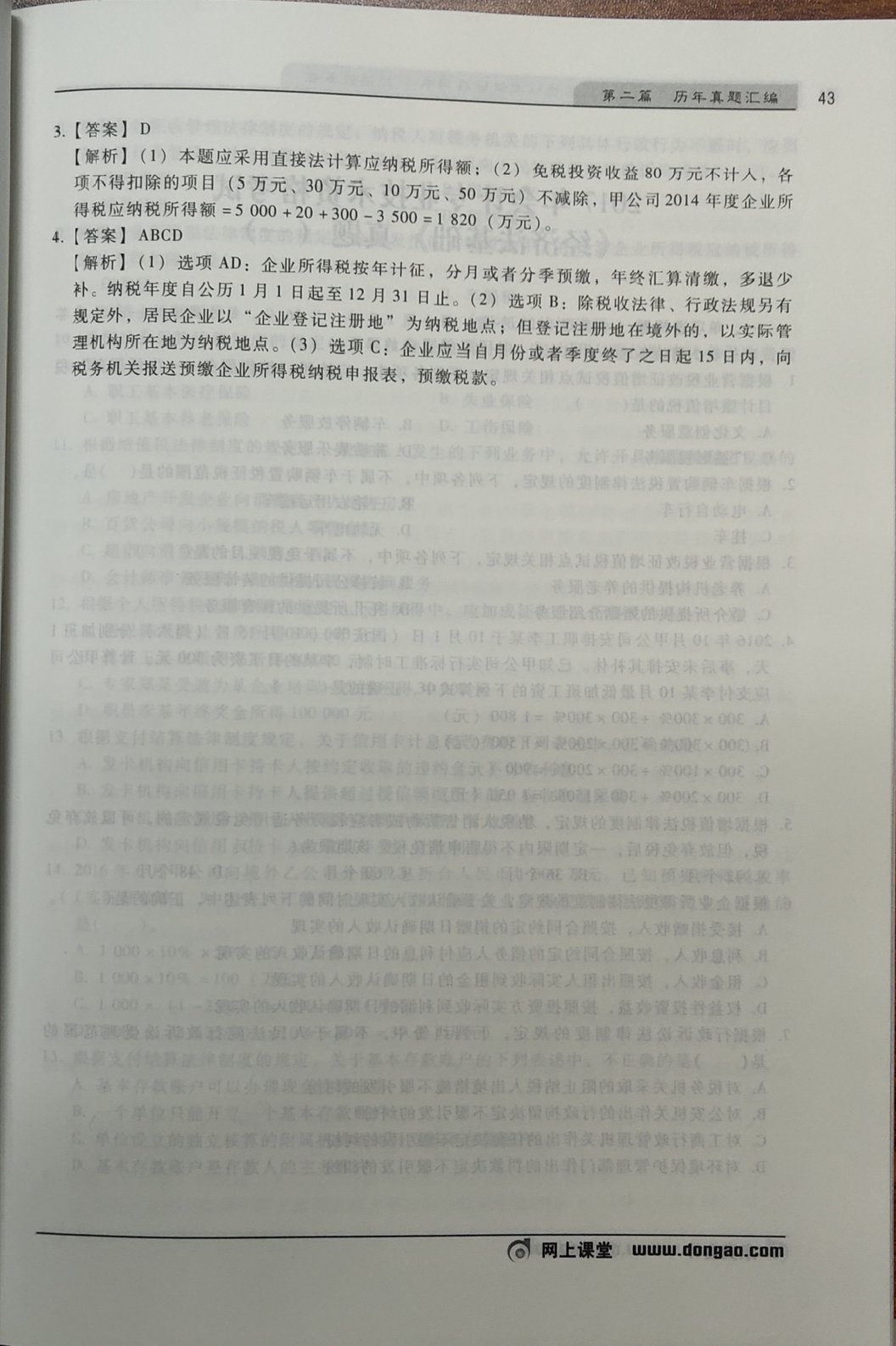

Back-side show-through is nearly gone after enhancement
Platforms
One package, everywhere
- Targets net10.0
- NativeAOT compatible (IsAotCompatible, no trim/AOT warnings)
- Models (~21 MB) load straight from embedded resources
- Measured on Snapdragon 8 Gen 3, RK3399 and in the browser
| OS | CPU | GPU |
|---|---|---|
| Windows | x64ARM64 | Vulkan |
| Linux | x64ARM64 | Vulkan |
| macOS | x64ARM64 | Metal |
| Android | ARM64 | Vulkan |
| Browser | wasm | – |
NuGet
Packages & models
The Models package is ~21 MB (GC-Net + DR-Net ONNX), shipped as embedded resources and versioned independently of the engine.
Credits
The model comes from the paper “Appearance Enhancement for Camera-captured Document Images in the Wild” (IEEE TAI 2023) and its upstream implementation ZZZHANG-jx/GCDRNet (weights under MIT, Copyright (c) 2024 Jiaxin Zhang).
Sample images and the test corpus come from the RealDAE dataset of the same paper (sdcb/DocGainFixture). The Sdcb.SimdGcdrNet engine is Apache-2.0.

C#/.NET Computer Vision community
Scan to join the WeChat group. The QR code rotates weekly — if it has expired, join QQ group 579060605 instead.